Player guide

Your first move.
Your next great story.

Create a hero, shape a world, and learn the systems that keep your adventure moving.

Start an adventure ↓

The essentials

AI Game Master is built around flexible text adventures. You can play solo, create your own worlds, recruit allies, carry champions between adventures, and push the story through custom actions instead of fixed menus.

Core App Features

  • Languages: English, Deutsch, Espanol, Francais, Hebrew, Japanese, and Russian.
  • Visual mode: Switch between dark and bright mode.
  • Music: Toggle music from the side bar. Music differs by genre.
  • Story detail: Verbose, Balanced, or Concise response styles.
  • Text speed and size: Adjust how quickly the text appears and how large it displays.
  • Character bar: Character portraits and health bars appear below the story. Tap them to open character sheets or hide the bar from the side menu.

Important Limits

The game is designed around improvisation. You can define rules, themes, and world logic, but the AI still behaves like a storyteller first. It will try to follow your setup, but it does not enforce systems with strict referee-level precision.

Choose your adventure

Adventure Types

Solo CampaignPlay solo and recruit NPC companions along the way.
Local GroupPlay with friends on the same device, up to 4 players.
Online CampaignPlayers join using a code. Only subscribed players can create multiplayer adventures.
Community AdventuresBrowse adventures created and published by other players, including your own published custom stories.

Build Your Own Quest

  • Up to 1500 characters for world settings.
  • Up to 1500 more characters for story, objectives, and major characters.
  • Intensity options: Peaceful, Balanced, Tough, and Brutal.
  • Choose theme color, image style, and custom visual instructions.
  • Check Publish if you want other players to find and play your creation.
Genre support: Fantasy, Horror, Sci-Fi, Apocalypse, Super Hero, Cyber-Punk, Fairytale, and Manga are playable themes, with some gated by subscription or tier progression.

Tokens & settings

Token Rule

Gameplay turns use tokens. Check the app for current costs and available free chat options. You can claim 5 free tokens every 4 hours by opening the game and pressing the receive button.

Online Turn Rules

Each player spends their own tokens in online play. If a player runs out, they cannot take a turn. Online adventures can run turn-by-turn or allow the first player who acts to take the next move.

Other Useful Controls

Report unexpected behavior in combat, healing, or sequel creation.

Champions & your chronicle

Champions

Each account can promote one champion by default, or up to four with subscription. Promote a character from the sheet using the edit icon in the top-left corner. Once promoted, that hero can be used in other adventures with their items and progress intact.

Champion Chat

Promoted champions can be chatted with from the main menu. The limit is 50 messages every 4 hours by default, or unlimited with subscription.

Hero Chronicle

  • The top-right Chronicle button tracks score and tier progression.
  • Points come from in-game actions like adventures played, enemies defeated, sequels played, and more.
  • Higher tiers unlock free tokens and some gated game features.
  • The Trophy button inside Hero Chronicle shows achievements you can collect during play.
  • Subscribed players can use the Adventure Card as a memory and creation tool for important rules, places, and characters.

Create your character

Character Creation

  • Create your own hero or let the GM generate one.
  • You can define name, appearance, race, class, gender, age, and background.
  • If you leave fields blank, the GM generates them from your character concept.
  • The more vivid the description, the stronger the AI follow-through during the adventure.

Stats

Every character uses four main stats: Force, Intellect, Charm, and Endurance. Stats are typically scored from 1 to 5, but you can push beyond those normal limits if you really want to.

Leveling

Characters gain XP from defeating enemies, healing, completing quests, recruiting allies, and collecting or crafting items. Every level-up grants extra HP and 2 Mana points.

Mana Uses

  • Increase stats
  • Increase inventory space
  • Learn special abilities

Special Abilities

Granted abilitiesCost 1 Mana point. The game creates 3 ability choices based on your character sheet and you choose one.
Custom abilitiesCost 2 Mana points. You can write any ability you want for your character.
CompanionsEvery 5 levels, a character can tame a wild companion that can travel with them and take part in story or battles.

Combat & healing

Encounter Mode

  • When an enemy attacks, the game enters Encounter Mode.
  • You describe your action, the GM resolves it using context, gear, level, and traits, and the enemy reacts.
  • Enemies have levels, HP bars, and their own abilities.
  • One enemy attacks at a time unless a group is defined as a single shared target.
  • You can describe attacks using several party members in one message.

What You Can Do

  • Fight directly
  • Use items
  • Use special abilities
  • Talk your way out
  • Try to run, though enemies may keep chasing you

Healing

Outside encounters, heal characters with skills, items, or creative story actions. You can request a specific amount or describe a long rest for full recovery. Multiple characters can be healed at once.

Death & Resurrection

Characters die at 0 HP. You can revive them by writing a resurrection into the story. If the entire party dies, reviving everyone costs 3 extra tokens.

Encounter Guide

Encounters let you describe how your characters face an enemy. The AI Game Master interprets your actions, and the game uses dice, character stats, and applicable bonuses to resolve them.

  • ForceHelps with physical attacks.
  • IntellectHelps reveal weaknesses and escape.
  • CharmHelps recruit enemies.
  • EnduranceIncreases your Armor Class.

Starting an encounter

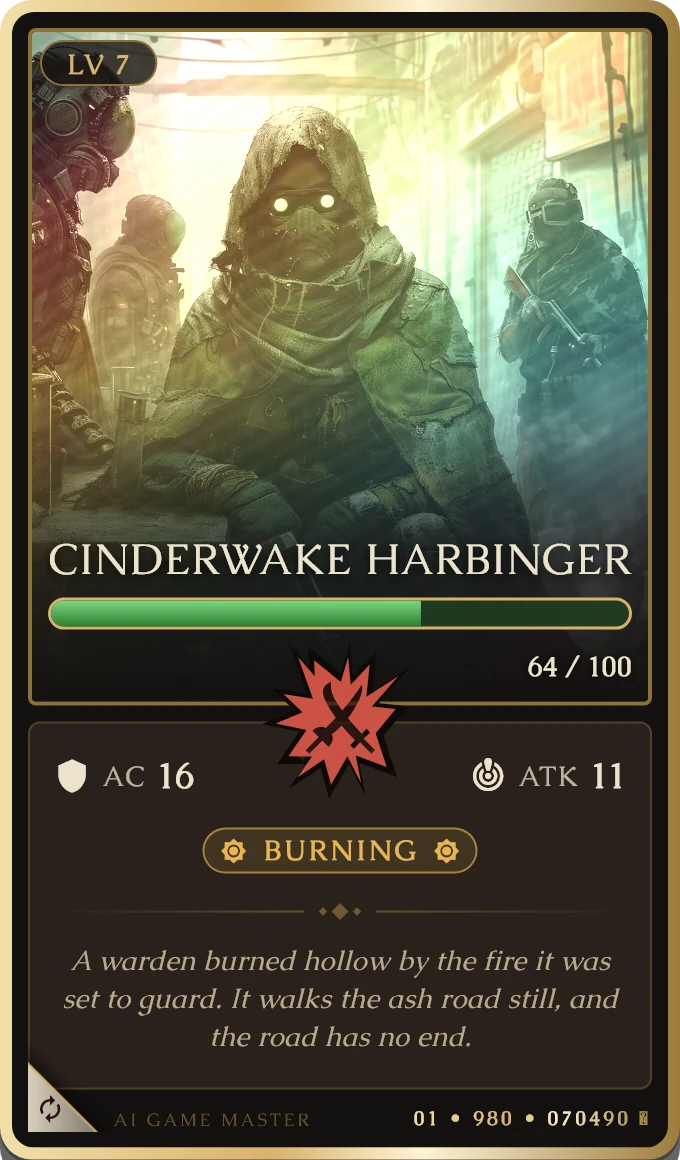
When a confrontation begins, you’ll see an enemy card with its health and combat information. Characters with higher Intellect may also uncover details about its abilities and weaknesses.

Describe what you want your characters to do. You can attack, use abilities or items, heal, attempt to recruit the enemy, or escape. Include character names and their intended actions to make your plan clear.

Front of the enemy card with a health bar, Armor Class, Attack, and Burning status
The front shows the enemy’s health and combat stats.
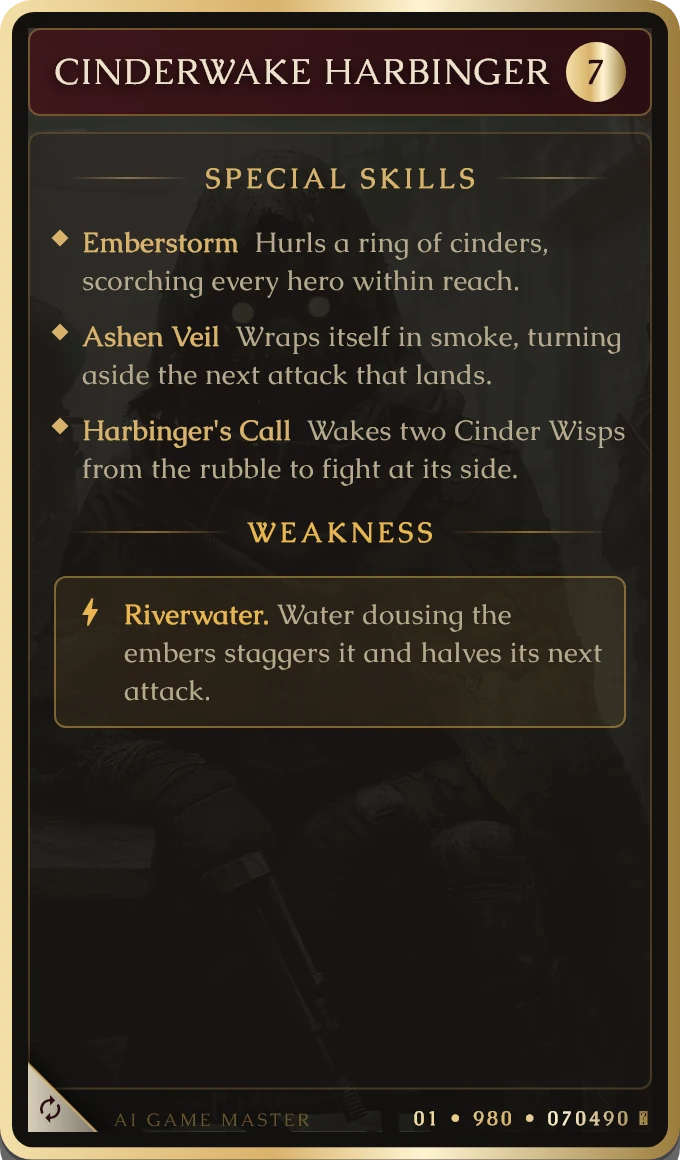
Back of the enemy card with its special abilities and weaknesses
Flip the card to check what your party has uncovered.

Actions and party members

You can describe up to three actions in total per turn. These actions can come from one character or be shared across the party.

“I attack with my sword, Mira casts a spell, and Jax heals me.”

The AI interprets your description. A maneuver like sidestepping and striking may count as one action. One character can take multiple actions, including separate attacks, if the AI interprets them that way.

If you want a party member to act, describe what they do. The current system does not guarantee that every party member will take an action on their own.

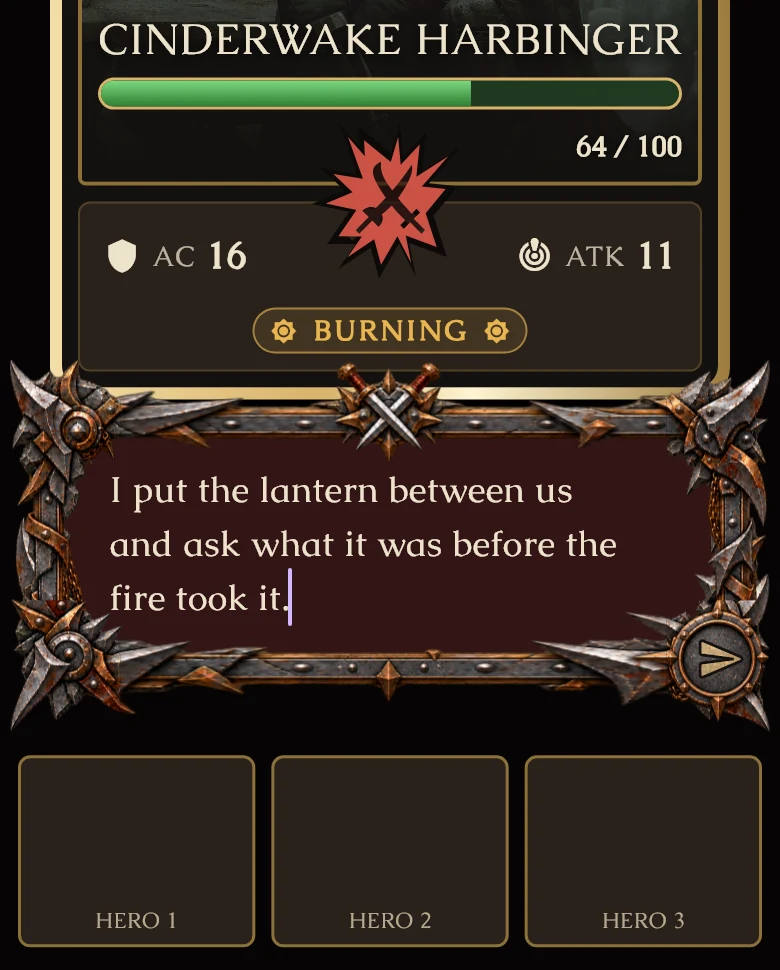
An action typed below the enemy’s combat stats and above the party row
Write your party’s moves in the encounter prompt.

Companions

You can also direct a companion, such as a pet, to attack. The companion’s attack counts as an action. Giving the order does not automatically create an additional attack for the character giving it.

A companion can contribute a d4 when the game recognizes it as taking part in a character’s action.

Attacking and hitting

Every enemy has an Armor Class, or AC, representing how difficult it is to hit. Your attack succeeds when its final roll is equal to or higher than the enemy’s AC.

The roll includes dice and a bonus based on the relevant character trait. Equipment, special abilities, and enemy weaknesses can also add bonuses when they apply.

The AI chooses the trait it considers most relevant to your action. A physical strike may use Force, while another action may use Intellect or a different trait.

Attack dice

Actions in the turnOrdinary attack diceSplit penalty
One1d20None
Two1d12 per attack−1d6
Three1d8 per attack−1d10

A d20 has twenty sides, a d12 has twelve, and so on. Add any applicable bonuses and subtract the split penalty once. Healing, recruitment, and escape use their own dice.

Attacking with multiple characters

Multiple offensive actions contribute to one attack result against the enemy’s AC. If it succeeds, each offensive action can deal damage.

“Mira attacks with her staff while Jax strikes with his sword.”

If the AI recognizes two attacks and the combined result succeeds, both can deal damage. The different dice and split penalty also affect the chance of success.

Critical hits and fumbles

On the main d20 of a single-action attack, a natural 20 is a critical hit and a natural 1 is a fumble.

For a combined attack, all the deciding attack dice must show their highest face for a critical hit or all show 1 for a fumble.

Only the main attack dice count toward a critical hit or fumble.

A critical hit deals maximum damage for the blow. A fumble misses and can cause the attacker to hurt themselves. Enemies can fumble too.

Damage and health

Damage depends on the relevant trait and the attack result. A stronger result can increase damage. When a combined attack succeeds, the total can include damage from several hits.

Weapons and other items can improve an attack through their combat bonuses. Their descriptions also give the AI context for interpreting and narrating what happens.

Enemy damage takes the health of the living party into account. An enemy can deal more damage when facing a larger party, and a stronger attack roll can increase that damage further. The damage goes to the character the enemy targets.

Character Armor Class

Your character’s Armor Class (AC) is based on their Endurance and any equipped items that provide an AC bonus.

When an enemy attacks, its roll hits if the result equals or exceeds the target’s AC.

Increasing Endurance or equipping suitable defensive items makes a character harder to hit.

Open the Endurance explanation on your character sheet to see the AC breakdown.

Equipment

  • Attack bonus

    An Attack bonus helps when the character uses that item in an action.

  • AC bonus

    An AC bonus improves defense while the item is equipped.

  • No combat bonus

    An item without a combat bonus can still be used in the story.

Equip an Attack item and describe using it to apply its bonus. For example, attack with your equipped sword. Using an unequipped item applies a −2 penalty to the action.

Item rarity

For items that have an Attack or AC bonus, rarity determines the possible bonus.

RarityPossible bonus
Common+1
Rare+1 or +2
Epic+1d4
Legendary+1d6
Gygax+1d10

A rare item can have the same combat bonus as a common item. Higher-rarity items use bonus dice, so their exact contribution can vary when rolled.

Rarity alone does not guarantee that an item has a combat bonus. Some items have no Attack or AC bonus.

Items from older adventures

Some items created before the current equipment system may load as Common or without a combat bonus if their older data does not include those fields. Players have reported cases where this does not reflect the history or importance of their equipment.

Special abilities and weaknesses

Describe the special ability you want to use. When the game recognizes it as part of an attack, it can add 1d4 to the roll.

If the AI recognizes that your action exploits a listed enemy weakness, it can also add 1d4. Higher Intellect can help reveal enemy weaknesses.

The AI uses ability descriptions and the situation to interpret and narrate actions. A described effect does not always receive a separate mechanical effect, so check how the game resolves the action.

Enemy status effects

An enemy can gain a status such as burning or frozen. Statuses can affect rolls during the encounter.

An enemy status lasts for three turns, including the turn on which it was applied.

Healing

You can use an action to heal yourself or another character. Roll a d100 to determine how much HP is restored, up to the recipient’s maximum health.

Currently, the healing amount comes from that die. The healer’s stats and equipment do not automatically increase the healing roll.

Recruiting an enemy

Recruitment uses a d20 and benefits from your character’s Charm.

The enemy’s remaining health affects the roll. A wounded enemy is generally easier to recruit, and one close to defeat may qualify for the Finish Him bonus.

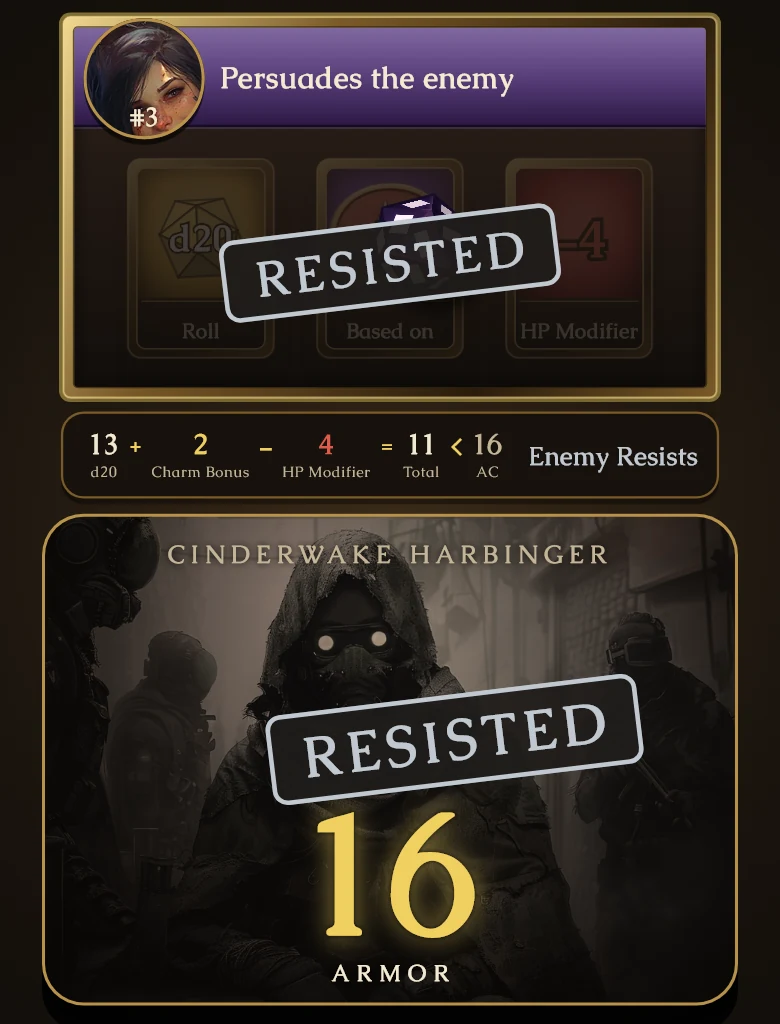
Dice table comparing a recruitment total of 11 with the enemy’s Armor Class of 16
A recruitment roll shows the Charm bonus and the enemy’s remaining health modifier.

Escaping

You can use an action to escape. The attempt uses a d20 and your character’s Intellect against the enemy’s Attack.

The party can leave after a failed escape roll, but a character may be struck while getting away.

Finish Him

When a living enemy has 5 HP or less, the first offensive action and each recruitment attempt can receive an extra 1d4.

A defeated enemy can be added to your Monster Codex, where you can view its card later.

Enemy strength and party size

Enemies are generated using the encounter difficulty, their level, and the living party’s stats and equipment. The game also adjusts enemy health based on the party’s expected damage.

Adding characters gives you more people who can act, and it can also affect the strength and health of the enemy you face.

In custom adventures, intensity influences encounter difficulty. Higher-intensity settings can produce tougher enemies, while Peaceful adventures normally avoid fights.

Dice settings and Story Mode

You can choose how much of the dice process to see.

  • Show All Rolls displays both party and enemy rolls.
  • Skip Rolls For Enemies resolves enemy rolls without showing their dice table.
  • Story Mode (No Dice) resolves both sides’ rolls without showing the dice tables.

The rolls still happen when their display is skipped.

You can turn encounters off in Settings. Finish any encounter already in progress first.

Example turn

Imagine your party faces an enemy and you write this turn.

“I attack with my equipped sword, Mira casts fire at the enemy, and Jax heals me.”

Your attack and Mira’s attack contribute to a combined result against the enemy’s AC. If it succeeds, both can deal damage. Jax’s healing uses a separate d100.

The enemy then takes its turn and may attack a character, using that character’s AC to determine whether the attack hits.

Your party. Your inventory.

Adding NPCs

You can invite story characters to join your quest. When an NPC is interested, the GM generates a character sheet and you can accept or reject them.

Removing NPCs

If a companion dies or leaves the story, remove them from the party through the edit button on their character sheet.

Inventory Basics

  • Characters usually begin with 1 or 2 items.
  • Base inventory size starts at 6 slots.
  • You can create new items in story by describing them and their properties.

Expanding Space

Increase inventory by spending Mana when leveling, or sometimes gain extra space after completing quests.

Moving Gear

You can move items between party members from the inventory screen by dragging them, or by writing the transfer in the story. Just name the character who should receive the item.

Quests & progression

Main Quest

Every adventure begins with a main quest that grants a large amount of XP when completed.

Side Quests

You can pick up side quests by asking for work, helping NPCs, or directly writing a quest request into the story. The GM can generate a mission description, goal, and reward.

Sequels

When you finish a main objective, you can continue the adventure into a sequel. The game can generate a follow-up goal based on your choices, which helps build a persistent world over multiple adventures.

Make every move count

Never Leave During A GM Response

Do not minimize or close the app while the GM is responding, especially during combat, quest generation, item creation, ally recruitment, or character generation. Wait until the response finishes before leaving the app.

Add A Pack Carrier Early

Use a mule, horse, camel, carry-bot, or magical beast as a storage character. Keep your main hero light and invest the support character’s level-up points into extra capacity.

Bind Important Powers To Items

If a power matters, attach it to a ring, cloak, gem, implant, or artifact and keep it in inventory. The GM remembers concrete objects more reliably than vague promises.

Spare Enemies When It Helps

Drop enemies to low HP, then intimidate, recruit, or bargain with them. Weak enemies can become guides, cooks, mercenaries, or suspicious but useful allies.

Use Backstory To Shape The Whole World

Put themes, naming styles, powers, and setting assumptions into your character background. The GM often treats those details as world truths, not just personal history.

Parentheses Save Tokens

Start a message with instructions in parentheses, then take your actual action in the same turn. This lets you guide tone or remind the GM of facts without spending a separate message.

More Useful Shortcuts

  • You can run away and some enemies may give up after enough turns.
  • The GM understands emojis, which can save space on the Adventure Card.
  • If a long campaign starts forgetting past events, recap your history in-character.
  • If you want the GM to loosely follow a ruleset like D&D 5e, define that in a custom adventure — but expect storytelling to come before strict enforcement.

Rewards & achievements

Free Token Actions

Player feedbackShare honest feedback with our team. App Store ratings and reviews are optional and are not rewarded.
Discord / Reddit / Instagram / Facebook / YouTube / TikTok10 tokens each for following the official account or community on the listed platform.
Bonus50 tokens for following at least 3 platforms.

How To Claim

Send screenshots by email to GM@AIGAMEMASTER.APP. After verification, the tokens are delivered shortly.

Tier Rewards

Increasing Hero Tier grants free tokens. Each tier rewards 30 tokens.

Achievements

Inside Hero Chronicle, the Trophy area tracks achievements earned during play. Trophies add Hero points, which help raise your tier.

When something goes wrong

Critical Warning

Never delete the app to fix a bug. Deleting the app can remove locally stored data. Confirm your backup before making changes.

Recovery Flow

  1. Send the message again a few times.
  2. If that fails, reword the message or change it completely.
  3. Return to the main menu and reopen the adventure from Saved Adventures.
  4. Fully close the app from recent apps and reopen it.
  5. Use only the in-app cache option if available. Do not clear device app storage or delete the app.
  6. Ask the Discord community for a workaround.
  7. Send a bug report from the app or email GM@AIGAMEMASTER.APP.

Loading Delays

Sometimes the AI text or image generation servers are simply slow. Longer loading does not always mean the save is broken.

Reporting an issue

Report unexpected behavior in combat, healing, or sequel creation.

If combat, healing, or a sequel stops working, try the recovery steps above. Include your app version, device, what happened, and what you expected when reporting the issue. Do not include private account information.